How to change playlists
When Free TV starts, it loads the default playlist ("Default TV Shows"). Only one playlist can be loaded at a time. To switch to a different playlist, use the Playlist Selector in the upper right corner. When you select a different playlist, the app will load data and display the categories from the newly-selected playlist.
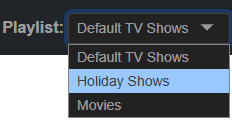
All Favorites and Recently Watched show titles are specific to the playlist that they belong to. So, if the "Default TV Shows" playlist is selected, and you add a show title to your Favorites, you will only see that title when the "Default TV Shows" playlist is selected. If you switch to a different playlist, you will only see Favorites and Recently Watched titles for the selected playlist. As you switch playlists you will see different Favorites and Recently Watched show titles.