Troubleshooting Problems
Many of the issues you might encounter while using Free TV are possibly related to issues with the Internet Archive servers or their internet connection. Some typical issues that you might encounter include:
- Video playing slowly or skipping
- Video buffering (constantly loading) and showing a spinner
- Video freezing
- Error messages like: "This item is no longer available."
- Episode Playlist not loading (or appearing in the UI)
- Video player not loading (seeing an error message instead)
One of the first things to do is to test your own internet connection. Make sure that you can browse other web sites and play videos. One of the easiest tests you can do is to go to YouTube and try to play a test video (just pick any title and try to play it). If the test video plays, then it means that your internet connection is working and you can stream video on your device. If this test fails, then it means that your device is not connected to the internet. Check your WiFi router, make sure your device is not in "Airplane Mode", and make sure that your ISP is not currently having network problems. If you have access to another device that has internet connectivity (e.g. a cellphone), you can visit Downdetector to see if your ISP is currently experiencing network issues.
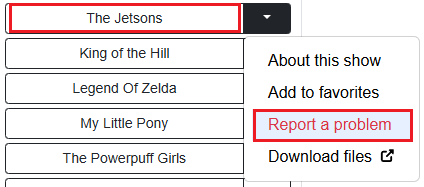
If you are seeing the message: "This item is no longer available" that means that the video you are trying to watch has been removed from the Internet Archive server and is no longer available. You can help us by reporting these errors. On the right side of each Show Title Button, there is a down arrow button (the Additional Actions Menu). Clicking this button will open a drop down menu. One of the options you'll see is "Report a problem". Click this link and a popup window will appear showing you information about the show you're reporting. If you click the "Report Problem" button, it will flag the item in our database and send the admin an alert so that it can be removed from our system. We appreciate your help reporting these broken titles. Please see the image below:
If you encounter timeout errors, videos not playing, freezing, or playing very slowly, this most likely is caused by issues with the Internet Archive's server or their internet connection. Your internet connection may be working perfectly. But, if their ISP is having issues then you might experience problems. The Internet Archive operates 6 data centers, mainly in California, with smaller ones in other U.S. states, Canada and Europe. If the video you are trying to watch is hosted on a server which is experiencing problems then it will not steam correctly. The Internet Archive is quite large (at least 48 petabytes) but, they do not have the resources that big companies like Google have. Thus, their network or servers may experience problems more frequently than other video streaming sites like YouTube without as much redundancy for guaranteed uptime. The Internet Archive is a non-profit organization which relies on donations from their users. While they do an excellent job, they aren't on the same financial level as big commercial companies like Google, Apple, or Microsoft which have billions of dollars and tens of thousands of employees. You can check Downdetector to see if the Internet Archive is currently having internet issues.
If you encounter a problem where the Episode Playlist is not loading (or appearing in the UI) this also seems to be an issue from the Internet Archive server. You might see this happen occasionally where the video loads on Free TV and you can play it but, no other show episodes appear in the Episode Playlist. (Or the Episode Playlist doesn't appear in the UI at all). This seems to be an issue related to JW Player (the video player software that the Internet Archive is using to stream their videos). One way you can try to fix this is to hit the Reload button in your browser and reload the page. Most of the time after a page reload, the Episode Playlist re-appears and it works fine. We currently don't know what causes this but, it comes from the embed code we are using which is coming directly from the Internet Archive servers. So, the issue is on their end and is not being caused by Free TV. A page reload seems to fix it.